
Notebook Page Layouts Explained: Lined, Grid, Dot Grid, Blank and Dated Planner Formats
Cover material and trim size are easy to compare — but the page layout inside is what shapes the daily writing experience. This guide covers the common notebook page layouts, dated planner formats, and the layouts that suit bullet journaling and Cornell notes, so brand teams and B2B buyers can choose by use case.
What Types of Notebook Page Layouts Are There?
Notebook pages fall into two broad groups, depending on whether dates are pre-printed:
- Dated pages — laid out by year, month, week or day. Common in business diaries and planners; ready to use along a timeline from day one.
- Undated pages — usable at any time, with no pre-printed dates. The common ruling styles are lined, grid, dot grid and blank.
The layout is only part of the decision: also consider how the notebook will be used, how much space each entry needs, and how paper and binding interact with the layout. For corporate custom projects, decide early whether a fixed year, a dated format, or mixed front and back sections are required.
Lined vs Grid vs Dot Grid vs Blank: How to Choose
| Layout | What it looks like | Best suited for | What to check |
|---|---|---|---|
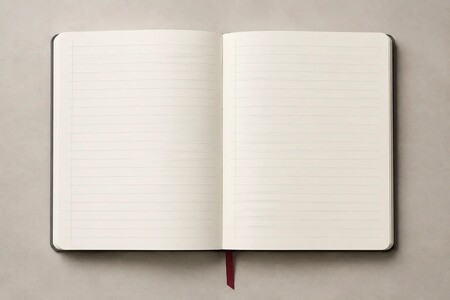
| Lined (ruled) | Horizontal lines keep text evenly spaced | Meeting notes, class notes, journals, long-form writing | Line spacing should match handwriting size and habits |
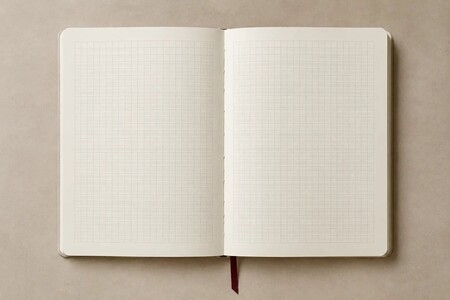
| Grid (squared) | Vertical and horizontal reference lines | Tables, charts, mixed text and diagrams, planners, calculations | Grid is visually prominent — confirm spacing and line weight |
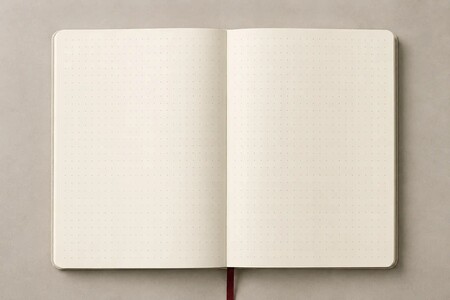
| Dot grid | Dots provide alignment with a lighter look | Free-form layouts, trackers, boxes and bullet journaling | Dot pitch and color affect alignment and page clarity |
| Blank (plain) | No printed guides at all | Sketching, mind maps, visual notes, free writing | For text-heavy use, consider a guide sheet underneath |
Dated Planner Layouts: Daily, Weekly and Monthly
Business diaries and planners are built around a dated structure. Common formats include:
- Daily (one day per page) — the most writing space per day; suits packed schedules and day-by-day records.
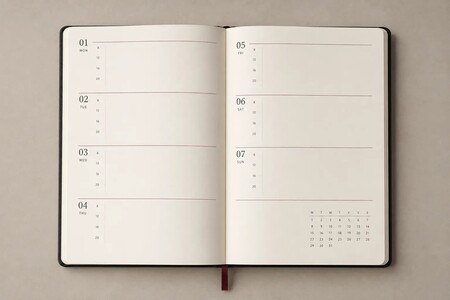
- Weekly (week across two pages) — the whole week at a glance, balancing planning against daily writing space.
- Monthly — a month per spread, suited to scheduling, meetings, deadlines and milestones.
- Yearly overview and business appendices — annual calendars plus reference sections planned around the project's needs.
Two weekly layouts can differ substantially: vertical time columns, horizontal day rows, or a schedule on the left with notes on the right. Compare the size of each day's writing area, whether time slots are needed, and how quickly a spread can be scanned.
In practice, many planners combine a monthly-planning front section with a notes section behind it, so one book covers both scheduling and note-taking. For custom projects with a fixed year, dated format or appendices, include the intended start year in your inquiry.
Bullet Journal and Cornell Notes: Which Layout Fits
Bullet journaling commonly uses dot grid pages, which make it easy to build indexes, monthly logs, daily entries and trackers; grid pages also work for those who prefer stronger guides. What matters is that the dot pitch suits your handwriting size and layout style.
Cornell notes divide the page into a cue column on the left, a main note area on the right and a summary strip below. You can use pre-printed Cornell pages, or divide grid or lined pages yourself. Corporate or education-focused custom notebooks can have the fixed sections printed in, saving users from drawing them on every page.
Specs to Confirm Before Production
Once the layout is chosen, these details determine how well layout, writing and production work together:
- Line or dot spacing — affects text size, alignment and how much fits on a page.
- Guide color and weight — too dark competes with the writing; too light is hard to see.
- Paper — weight, surface finish and printing method all affect the writing experience; evaluate against the pens the users are likely to use.
- Margins and gutter — must suit the binding so text and guides don't run into the spine.
- Page count and page order — dated pages, monthly plans, appendices and free note pages should be sequenced up front.
- Binding method — lay-flat writing, removable pages or extra durability each point to different bindings.
Can Custom Notebooks Mix Different Page Layouts?
Subject to specification review, yes. A custom notebook can use a specified layout throughout, or combine sections by purpose — for example a monthly-planning front section with dot grid note pages behind it, or a yearly overview and project pages before the note section.
Not every combination is feasible page-by-page: practical limits depend on page count, page order, printing method, imposition and binding structure, and are confirmed during quotation and sampling.
See actual page styles: Inner page formats | Related: Notebook & planner buying guide | Ordering process
Frequently Asked Questions
What is the difference between dot grid and grid?
Grid pages use full crossing lines for strong, explicit alignment; dot grid marks the same intersections with dots only, so the page looks lighter and layouts stay flexible. Both handle mixed text and diagrams — the choice mostly comes down to how visible you want the guides to be.
Dated or undated pages — which should I choose?
Dated pages come pre-printed with the year, month, week or day, ready to use along a timeline — best for fixed schedules and day-by-day records, at the cost of blank days when unused and replacement after year-end. Undated pages can start any time and waste nothing, but users date entries themselves. Decide based on how regularly the notebook will be used and whether a fixed year matters.
Which layouts suit A6 and other small notebooks?
The smaller the page, the more line and dot spacing matters relative to handwriting size. For quick notes and to-do lists, lined or dot grid works well; for tables, double-check the grid spacing. If a small format carries a dated layout, one-day-per-page provides the most writing space per day but increases total pages and thickness, while weekly or monthly layouts keep the book thin at the cost of smaller daily fields. Weigh daily writing volume, portability and finished thickness.
Daily, weekly or monthly planner layout — how to decide?
Daily provides the most writing space per day, for packed schedules and detailed records. Weekly shows the whole week per spread, balancing planning and writing space. Monthly presents a month at a time for scheduling, meetings and deadlines. Weekly layouts also vary — vertical time columns, horizontal day rows, or a schedule on the left with notes on the right — so compare daily field size and whether time slots are needed. Sections can also be combined in one book.
Can the pages carry our company's own forms or templates?
Custom pages can be evaluated for company-specific forms, fields, project trackers, internal process pages, flyleaves and appendices, subject to project review. If you have layout files, include them with the inquiry; if not, describe the use case and the fields you need to record. Final layout, print and binding feasibility is confirmed before quotation and sampling.
How many pages should a notebook have?
First, note how counting works: one sheet has two sides and usually counts as two pages, so "sheets" and "pages" are not the same number. When specifying, state the total page count and whether it includes flyleaves, blank pages, appendices and dated sections. Page count drives thickness, binding structure and weight — more is not automatically better. Estimate from the usage period and typical writing volume, counting dated sections separately; the practical range for a given binding is confirmed before quotation and sampling.
Will writing show through or feather on the paper?
Show-through, feathering and bleed can't be judged by paper weight alone — fiber, surface treatment, the pen and its ink flow all contribute. Fountain pens and markers, which lay down more ink, tend to reveal differences between papers most clearly. If the main writing instrument is known, test it on the actual paper at the sampling stage. Paper choice also affects thickness and weight, so evaluate it together with page count and binding.
Can one custom notebook combine different layouts?
Yes, subject to page count, page order, printing method and binding structure. Include each section's purpose and estimated page count in your inquiry, and feasibility is confirmed before quotation and sampling.
Planning a Custom Notebook or Planner?
Tell us the intended use, estimated page count, page layout and whether a dated format is required — we'll help evaluate the layout and production options. For dated planners, please include the intended start year.
See the ordering process Contact PUNDY
Email: pundy@pundy.com | Tel: +886-2-2225-6199